Somewhere between the filming, the editing, the writing, the posting, Best Productivity Tools for Content Creatorsand the endless stream of notifications, most content creators lose the one resource they can never get back: time. The creators who consistently publish, grow, and monetize their work aren’t necessarily more talented — they’re often just better equipped. That’s why finding the best productivity tools for content creators isn’t a nice-to-have. It’s the difference between a sustainable creative career and constant burnout.
This article walks through the categories of tools that actually move the needle, why each one matters, and how to choose the right stack for your workflow instead of collecting apps you’ll never open again.
Why Productivity Tools Matter More Than Motivation
It’s tempting to think discipline alone will keep a content calendar on track. But even the most motivated creator will drown without systems, because content creation involves dozens of small, repetitive tasks: scheduling, editing, repurposing, replying to comments, tracking analytics, and managing client or sponsor communication.
The best productivity tools for content creators aren’t about doing more — they’re about removing friction so your energy goes toward the work that actually requires creativity: writing, filming, designing, and connecting with your audience. Every minute saved on busywork is a minute reinvested into higher-quality content.
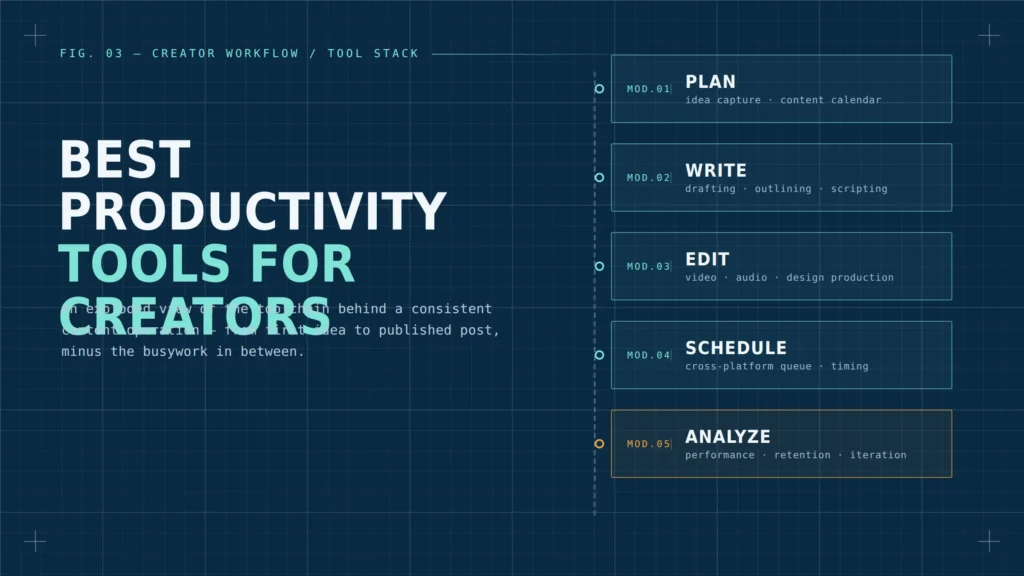
Content Planning and Organization
Before a single video is filmed or a single word is written, planning tools keep your ideas from disappearing into scattered notes and forgotten voice memos.
Look for a system that lets you:
- Capture ideas instantly, from your phone or desktop, without breaking your current task
- Organize content into a visual calendar so you can see gaps and overlaps at a glance
- Tag and categorize ideas by platform, format, or campaign
- Track a piece of content from “idea” to “published” without losing context along the way
Whether you use a simple kanban board, a dedicated content calendar app, or a project management tool repurposed for content, the goal is the same: a single source of truth so nothing falls through the cracks.
Writing and Scripting Tools
Whether you’re drafting video scripts, blog posts, captions, or newsletters, writing tools reduce the friction between “I have an idea” and “I have a finished draft.”
Strong writing tools typically offer:
- Distraction-free writing modes that hide clutter and keep you focused on the page
- Grammar and clarity checking that catches issues without disrupting your voice
- Outlining features that help structure long-form content before you write a single sentence
- AI-assisted drafting for repurposing one piece of content into multiple formats
The right writing tool won’t write your content for you — but it will remove the friction that keeps a first draft from ever getting finished.
Editing and Production Tools
For creators working in video, audio, or design, editing software is where the most time is typically lost. Modern editing tools have evolved far beyond simple cutting and trimming.
Features worth prioritizing include:
- Automatic transcription and captioning to speed up subtitle creation
- Templates for recurring formats like intros, lower-thirds, or social clips
- Batch export options so multiple platform sizes can be generated from a single edit
- Cloud-based collaboration for creators working with editors or teams remotely
Choosing editing software that matches your actual skill level and content style matters more than chasing the tool with the most features. A simpler tool used consistently will always outperform a powerful tool that intimidates you into avoidance.
Scheduling and Distribution Tools
Once content is created, getting it published consistently — across multiple platforms — is its own logistical challenge. Scheduling tools solve the problem of manually logging into five different apps every single day.
The best scheduling tools allow you to:
- Queue content across multiple platforms from a single dashboard
- Preview how posts will look before they go live
- Adjust posting times based on when your specific audience is most active
- Recycle evergreen content automatically without manual reposting
This category alone can reclaim hours each week, especially for creators managing more than one platform or account.
Analytics and Feedback Tools
Creating content without reviewing performance data is like publishing into a void. Analytics tools translate vague feelings like “that post didn’t do well” into specific, actionable insight.
Useful analytics tools help you:
- Track which content formats and topics consistently outperform others
- Understand audience retention points in videos, not just total views
- Compare performance across platforms in one unified view
- Identify your best-performing posting times and content lengths
The goal isn’t to obsess over every metric daily, but to review patterns regularly enough to inform your next content decisions.
Communication and Collaboration Tools
As soon as a creator starts working with editors, virtual assistants, sponsors, or a small team, communication tools become just as important as creative ones. Scattered messages across email, text, and social DMs create unnecessary chaos.
A dedicated workspace for project updates, file sharing, and feedback threads keeps collaboration organized and prevents important details from getting lost in a group chat.
Building Your Own Productivity Stack
The mistake many creators make is trying to adopt every tool at once. Instead, build your stack deliberately:
- Start with the bottleneck that costs you the most time right now — not the tool that looks the most impressive.
- Choose one tool per category rather than several overlapping apps doing the same job.
- Give each new tool a real two-to-four-week trial before deciding whether it earns a permanent place in your workflow.
- Remove anything that adds more setup time than it saves in daily use.
A lean, well-chosen stack will always beat a bloated one filled with apps you opened once and forgot about.
Also Read
Course vs Ebook: Which to Launch First?
Final Thoughts
There is no single “best” tool that works for every creator, because workflows, platforms, and content formats vary widely. What matters is identifying where your time actually leaks — planning, writing, editing, scheduling, or reviewing performance — and choosing tools that directly address that friction.
The best productivity tools for content creators aren’t the flashiest or most talked-about apps on social media. They’re the ones that quietly disappear into your workflow, save you hours every week, and let you spend your creative energy where it belongs: on the content itself.